Fedora 25 クイック設定メモ
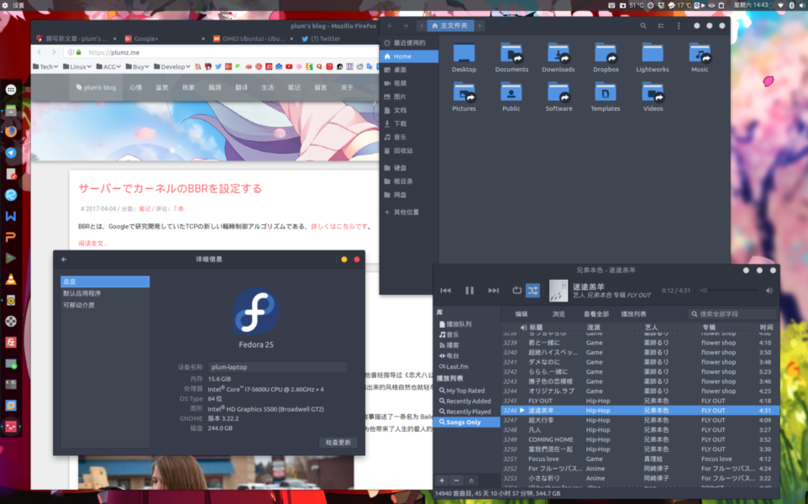
ここで言う Fedora 25 は Gnome-Shell ベースの Fedora 25 ディストリビューションのこと。
先に結論から書くと、設定を済ませた Fedora 25 + Gnome-Shell はほぼ使えるレベルになる。ただし「ほぼ」であって、それ以上ではない。
RPMFusion を有効にする
sudo dnf install https://download1.rpmfusion.org/free/fedora/rpmfusion-free-release-$(rpm -E %fedora).noarch.rpm https://download1.rpmfusion.org/nonfree/fedora/rpmfusion-nonfree-release-$(rpm -E %fedora).noarch.rpm
Gnome-Tweak-Tools をインストール
sudo dnf install gnome-tweak-tool
sudo dnf install dconf-editor
Arc-theme をインストール
sudo dnf install arc-theme
vim をインストール
sudo dnf install vim
SS をインストール
sudo dnf copr enable librehat/shadowsocks
sudo dnf install shadowsocks-libev
sudo vim /usr/lib/systemd/system/shadowsocks-libev.service
sudo vim /etc/shadowsocks-libev/config.json
systemctl daemon-reload
systemctl restart  shadowsocks-libev.service
systemctl status  shadowsocks-libev.service
DNF にプロキシを設定する
sudo vim /etc/dnf/dnf.conf
proxy=socks5://127.0.0.1:1080 fastestmirror=true
Fedy をインストール
curl https://www.folkswithhats.org/installer | sudo bash
Fedy で msfonts telegram adobeflash エンコーダーといくつかの簡単な設定を入れる。フォントの最適化はやらない。
cd /etc/yum.repos.d/
sudo rm fedora-multimedia.repo
Acr-Theme-Solid をインストール
sudo dnf config-manager --add-repo http://download.opensuse.org/repositories/home:Horst3180/Fedora_25/home:Horst3180.repo
sudo dnf install arc-theme-solid
git clone https://github.com/andreisergiu98/arc-flatabulous-theme && cd arc-flatabulous-theme
sudo dnf install autoconf automake pkgconfig gtk3-devel git
./autogen.sh --prefix=/usr --disable-transparency
sudo make install
tilix をインストール
sudo dnf copr enable heikoada/terminix
sudo dnf install tilix
TLP をインストール
sudo dnf install kernel-devel
sudo dnf install tlp tlp-rdw
sudo dnf install http://repo.linrunner.de/fedora/tlp/repos/releases/tlp-release-1.0-0.noarch.rpm
sudo dnf --enablerepo=tlp-updates-testing install akmod-tp_smapi akmod-acpi_call kernel-devel
sudo vim /etc/default/tlp
sudo tlp start
sudo dnf copr enable mpmly/thermald
sudo dnf install thermald
sudo systemctl enable thermald
sudo systemctl start thermald
Intel のティアリングを修正する
sudo vim /etc/X11/xorg.conf.d/20-intel.conf
Section "Device"
   Identifier  "Intel Graphics"
   Driver      "intel"
#  Option      "AccelMethod"  "sna"
   Option      "TearFree"    "true"
EndSection
freetype のフォントレンダリングを入れる
sudo dnf install freetype-freeworld
Ubuntu Fonts をインストール
wget http://font.ubuntu.com/download/ubuntu-font-family-0.80.zip\
mkdir /tmp/ubuntu-font-family-0.80\
unzip -j ubuntu-font-family-0.80.zip -d /tmp/ubuntu-font-family-0.80\
rm -f ubuntu-font-family-0.80.zip\
sudo mkdir /usr/share/fonts/ubuntu\
sudo mv /tmp/ubuntu-font-family-0.80/*.ttf /usr/share/fonts/ubuntu\
rm -rf /tmp/ubuntu-font-family-0.80\
cd /usr/share/fonts/ubuntu\
ttmkfdir > fonts.dir\
fc-cache -fv
WenQuanYi をインストール
sudo dnf install wqy-microhei-fonts wqy-zenhei-fonts wqy-bitmap-fonts
フォント表示の最適化を開始する。目標は Ubuntu
sudo gedit /etc/fonts/conf.avail/69-language-selector-zh-cn.conf
<?xml version="1.0"?>
<!DOCTYPE fontconfig SYSTEM "fonts.dtd">
<fontconfig>
  <match target="pattern">
    <test qual="any" name="family">
      <string>serif</string>
    </test>
    <edit name="family" mode="prepend" binding="strong">
      <string>Bitstream Vera Serif</string>
      <string>HYSong</string>
      <string>AR PL UMing CN</string>
      <string>AR PL UMing HK</string>
      <string>AR PL ShanHeiSun Uni</string>
      <string>AR PL New Sung</string>
      <string>WenQuanYi Bitmap Song</string>
      <string>AR PL UKai CN</string>
      <string>AR PL ZenKai Uni</string>
    </edit>
  </match>
  <match target="pattern">
    <test qual="any" name="family">
      <string>sans-serif</string>
    </test>
    <edit name="family" mode="prepend" binding="strong">
      <string>Bitstream Vera Sans</string>
      <string>WenQuanYi Micro Hei</string>
      <string>WenQuanYi Zen Hei</string>
      <string>Droid Sans Fallback</string>
      <string>HYSong</string>
      <string>AR PL UMing CN</string>
      <string>AR PL UMing HK</string>
      <string>AR PL ShanHeiSun Uni</string>
      <string>AR PL New Sung</string>
      <string>AR PL UKai CN</string>
      <string>AR PL ZenKai Uni</string>
    </edit>
  </match>
  <match target="pattern">
    <test qual="any" name="family">
      <string>monospace</string>
    </test>
    <edit name="family" mode="prepend" binding="strong">
      <string>Bitstream Vera Sans Mono</string>
      <string>WenQuanYi Micro Hei Mono</string>
      <string>WenQuanYi Zen Hei Mono</string>
      <string>Droid Sans Fallback</string>
      <string>HYSong</string>
      <string>AR PL UMing CN</string>
      <string>AR PL UMing HK</string>
      <string>AR PL ShanHeiSun Uni</string>
      <string>AR PL New Sung</string>
      <string>AR PL UKai CN</string>
      <string>AR PL ZenKai Uni</string>
    </edit>
  </match>
</fontconfig>
sudo vim /etc/fonts/local.conf
<?xml version='1.0'?>
<!DOCTYPE fontconfig SYSTEM 'fonts.dtd'>
<fontconfig>
    <match target="font">
        <edit name="antialias" mode="assign">
            <bool>true</bool>
        </edit>
        <edit name="autohint" mode="assign">
            <bool>false</bool>
        </edit>
        <edit name="embeddedbitmap" mode="assign">
            <bool>false</bool>
        </edit>
        <edit name="hinting" mode="assign">
            <bool>true</bool>
        </edit>
        <edit name="hintstyle" mode="assign">
            <const>hintslight</const>
        </edit>
        <edit name="lcdfilter" mode="assign">
            <const>lcdlight</const>
        </edit>
        <edit name="rgba" mode="assign">
            <const>rgb</const>
        </edit>
        <edit name="embeddedbitmap" mode="assign">
            <bool>false</bool>
        </edit>
    </match>
</fontconfig>
echo "Xft.lcdfilter: lcddefault" > ~/.Xresources

sudo vim /etc/fonts/conf.d/65-0-nonlatin-custom.conf
<?xml version="1.0" encoding="UTF-8"?>
<!DOCTYPE fontconfig SYSTEM "fonts.dtd">
<fontconfig>
    <match>
        <test name="lang" compare="contains">
            <string>zh-cn</string>
        </test>
        <test name="family">
            <string>monospace</string>
        </test>
        <edit name="family" mode="prepend">
            <string>Noto Sans Mono CJK SC</string>
        </edit>
    </match>

    <match>
        <test name="lang" compare="contains">
            <string>zh-tw</string>
        </test>
        <test name="family">
            <string>monospace</string>
        </test>
        <edit name="family" mode="prepend">
            <string>Noto Sans Mono CJK TC</string>
        </edit>
    </match>

    <match>
        <test name="lang" compare="contains">
            <string>jp</string>
        </test>
        <test name="family">
            <string>monospace</string>
        </test>
        <edit name="family" mode="prepend">
            <string>Noto Sans Mono CJK JP</string>
        </edit>
    </match>

    <match>
        <test name="lang" compare="contains">
            <string>zh-cn</string>
        </test>
        <test name="family">
            <string>serif</string>
        </test>
        <edit name="family" mode="prepend">
            <string>Noto Sans CJK SC</string>
        </edit>
    </match>

    <match>
        <test name="lang" compare="contains">
            <string>zh-tw</string>
        </test>
        <test name="family">
            <string>serif</string>
        </test>
        <edit name="family" mode="prepend">
            <string>Noto Sans CJK TC</string>
        </edit>
    </match>

    <match>
        <test name="lang" compare="contains">
            <string>jp</string>
        </test>
        <test name="family">
            <string>serif</string>
        </test>
        <edit name="family" mode="prepend">
            <string>Noto Sans CJK JP</string>
        </edit>
    </match>

    <match>
        <test name="lang" compare="contains">
            <string>zh-cn</string>
        </test>
        <test name="family">
            <string>sans-serif</string>
        </test>
        <edit name="family" mode="prepend">
            <string>Noto Sans CJK SC</string>
        </edit>
    </match>

    <match>
        <test name="lang" compare="contains">
            <string>zh-tw</string>
        </test>
        <test name="family">
            <string>sans-serif</string>
        </test>
        <edit name="family" mode="prepend">
            <string>Noto Sans CJK TC</string>
        </edit>
    </match>

    <match>
        <test name="lang" compare="contains">
            <string>jp</string>
        </test>
        <test name="family">
            <string>sans-serif</string>
        </test>
        <edit name="family" mode="prepend">
            <string>Noto Sans CJK JP</string>
        </edit>
    </match>
</fontconfig>
sudo gedit ~/.fonts.conf
<?xml version='1.0'?>
<!DOCTYPE fontconfig SYSTEM 'fonts.dtd'>
<fontconfig>
 <match target="font">
  <edit mode="assign" name="rgba">
   <const>rgb</const>
  </edit>
 </match>
 <match target="font">
  <edit mode="assign" name="hinting">
   <bool>true</bool>
  </edit>
 </match>
 <match target="font">
  <edit mode="assign" name="autohint">
   <bool>true</bool>
  </edit>
 </match>
 <match target="font">
  <edit mode="assign" name="hintstyle">
   <const>hintfull</const>
  </edit>
 </match>
 <match target="font">
  <edit mode="assign" name="lcdfilter">
   <const>lcddefault</const>
  </edit>
 </match>
 <match target="font">
  <edit mode="assign" name="antialias">
   <bool>true</bool>
  </edit>
 </match>
  <match target="pattern">
    <test qual="any" name="family">
      <string>serif</string>
    </test>
    <edit name="family" mode="prepend" binding="strong">
      <string>Bitstream Vera Serif</string>
      <string>HYSong</string>
      <string>AR PL UMing CN</string>
      <string>AR PL UMing HK</string>
      <string>AR PL ShanHeiSun Uni</string>
      <string>AR PL New Sung</string>
      <string>WenQuanYi Bitmap Song</string>
      <string>AR PL UKai CN</string>
      <string>AR PL ZenKai Uni</string>
    </edit>
  </match>
  <match target="pattern">
    <test qual="any" name="family">
      <string>sans-serif</string>
    </test>
    <edit name="family" mode="prepend" binding="strong">
      <string>Bitstream Vera Sans</string>
      <string>WenQuanYi Micro Hei</string>
      <string>WenQuanYi Zen Hei</string>
      <string>Droid Sans Fallback</string>
      <string>HYSong</string>
      <string>AR PL UMing CN</string>
      <string>AR PL UMing HK</string>
      <string>AR PL ShanHeiSun Uni</string>
      <string>AR PL New Sung</string>
      <string>AR PL UKai CN</string>
      <string>AR PL ZenKai Uni</string>
    </edit>
  </match>
  <match target="pattern">
    <test qual="any" name="family">
      <string>monospace</string>
    </test>
    <edit name="family" mode="prepend" binding="strong">
      <string>Bitstream Vera Sans Mono</string>
      <string>WenQuanYi Micro Hei Mono</string>
      <string>WenQuanYi Zen Hei Mono</string>
      <string>Droid Sans Fallback</string>
      <string>HYSong</string>
      <string>AR PL UMing CN</string>
      <string>AR PL UMing HK</string>
      <string>AR PL ShanHeiSun Uni</string>
      <string>AR PL New Sung</string>
      <string>AR PL UKai CN</string>
      <string>AR PL ZenKai Uni</string>
    </edit>
  </match>
</fontconfig>
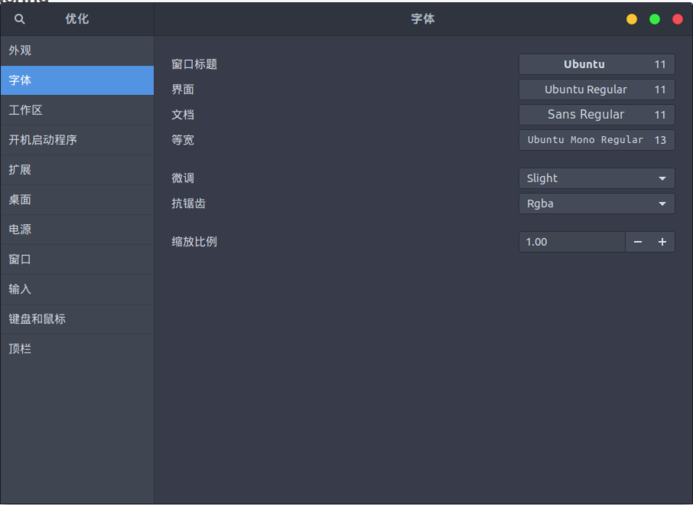
フォントを設定する
プラグインをインストールするために
sudo dnf copr enable region51/chrome-gnome-shell
sudo dnf install chrome-gnome-shell
細々したソフトをインストール
sudo dnf install leafpad vlc smplayer filezilla remmina easytag terminator
ハードディスクをマウント
export LANG=en_US
xdg-user-dirs-gtk-update
export LANG=zh_CN
ln -s /HDD/Documents/ ~/\
ln -s /HDD/Downloads/ ~/\
ln -s /HDD/Music/ ~/\
ln -s /HDD/Pictures/ ~/\
ln -s /HDD/Videos/ ~/\
ln -s /HDD/Dropbox/ ~/\
ln -s /HDD/Software/ ~/
HiRes 対応を修正
sudo vim /etc/pulse/daemon.conf
pulseaudio -k
pulseaudio --start
default-sample-format = s24le
default-sample-rate = 192000
alternate-sample-rate = 96000
BT-SYNC をインストール
sudo vim /etc/yum.repos.d/resilio-sync.repo
[resilio-sync]
name=Resilio Sync $basearch
baseurl=http://linux-packages.resilio.com/resilio-sync/rpm/$basearch
enabled=1
gpgcheck=1
sudo rpm --import https://linux-packages.resilio.com/resilio-sync/key.asc
sudo yum install resilio-sync
sudo systemctl enable resilio-sync
sudo vim /usr/lib/systemd/user/resilio-sync.service
WantedBy=multi-user.target” to “WantedBy=default.target”.
systemctl --user enable resilio-sync
systemctl --user start resilio-sync
アイコンテーマをインストール
sudo dnf copr enable dirkdavidis/papirus-icon-theme
sudo dnf install papirus-icon-theme
Emoji テーマをインストール
sudo dnf copr enable heffer/emojione
sudo dnf install emojione-color-fonts
Firefox のキャッシュを強化
1. open up about:config (type it into the url bar)
2. type browser.cache into the filter bar at the top.
3. Find browser.cache.disk.enable and set it to false (by double clicking on it).
4. set browser.cache.memory.enable to true
5. create a new preference by right clicking anywhere, hit New, and choose Integer.
6. Call the new preference browser.cache.memory.capacity and hit OK.
7. In the next window, where it asks for the number of kilobytes you want to assign to the cache, just enter -1 to tell Firefox to dynamically determine the cache size.
囧脸输入法をインストール
sudo dnf install fcitx fcitx-cloudpinyin fcitx-libpinyin fcitx-configtool
gsettings set org.gnome.settings-daemon.plugins.keyboard active false
sudo vim /etc/environment
wayland のサポートを追加
export GTK_IM_MODULE=fcitx
export QT_IM_MODULE=fcitx
export XMODIFIERS=@im=fcitx
FZUG リポジトリを追加して、一時的に Deadbeef をインストール
sudo dnf config-manager --add-repo=http://repo.fdzh.org/FZUG/FZUG.repo
sudo dng install deadbeef
ZSH をインストール
sudo dnf install zsh
sh -c "$(wget https://raw.github.com/robbyrussell/oh-my-zsh/master/tools/install.sh -O -)"
wget --no-check-certificate https://raw.githubusercontent.com/seebi/dircolors-solarized/master/dircolors.ansi-dark
mv dircolors.ansi-dark .dircolors
eval `dircolors ~/.dircolors`
DEFAULT_USER="plum"
ZSH_THEME="agnoster"
COMPLETION_WAITING_DOTS="true"
alias lsa="ls -A"
eval `dircolors ~/.dircolors`
プラグインをインストール
Firefox にプラグインをインストール: https://addons.mozilla.org/zh-CN/firefox/addon/gnome-shell-integration/reviews/?src=api
インストール https://extensions.gnome.org/extension/595/autohide-battery/ https://extensions.gnome.org/extension/759/better-volume-indicator/ https://extensions.gnome.org/extension/779/clipboard-indicator/ https://extensions.gnome.org/extension/307/dash-to-dock/ https://extensions.gnome.org/extension/1011/dynamic-panel-transparency/ https://extensions.gnome.org/extension/2/move-clock/ https://extensions.gnome.org/extension/1128/hide-activities-button/ https://extensions.gnome.org/extension/261/kimpanel/ https://extensions.gnome.org/extension/1097/keep-awake/ https://extensions.gnome.org/extension/36/lock-keys/ https://extensions.gnome.org/extension/55/media-player-indicator/ https://extensions.gnome.org/extension/750/openweather/ https://extensions.gnome.org/extension/708/panel-osd/ https://extensions.gnome.org/extension/723/pixel-saver/ https://extensions.gnome.org/extension/72/recent-items/ https://extensions.gnome.org/extension/800/remove-dropdown-arrows/ https://extensions.gnome.org/extension/1112/screenshot-tool/ https://extensions.gnome.org/extension/1145/sensory-perception/ https://extensions.gnome.org/extension/906/sound-output-device-chooser/ https://extensions.gnome.org/extension/355/status-area-horizontal-spacing/ https://extensions.gnome.org/extension/1031/topicons/ https://extensions.gnome.org/extension/131/touchpad-indicator/ https://extensions.gnome.org/extension/19/user-themes/
絶対にインストールしないでください: https://extensions.gnome.org/extension/517/caffeine/ 代わりにこれを使ってください: https://github.com/jenspfahl/KeepAwake
Firefox の tweak いろいろ
about:config
gfx.font_rendering.fontconfig.fontlist.enabled   -> false
rowser.tabs.remote.autostart   -> true
layers.offmainthreadcomposition.testing.enabled  -> true
dom.ipc.processCount   -> 16
browser.tabs.remote.force-enable -> true
その他
1、wayland は Xorg より速くない 2、Gnome-shell のテーマは動作を遅くするので、ネイティブで使えるならネイティブで 3、Fedora の DNF は Ubuntu ほど速くない 4、全画面で使えるなら全画面で、複数のプログラムを使うときは自分で workspace を追加して放り込んで切り替える、これが Gnome-shell の設計思想 5、Dock to dash のスマート表示機能はデスクトップ全画面以外では引っ込ませておくのがベスト、そうしないとやっぱり遅くなる 6、Gnome-shell の設計思想に素直に従うこと、抵抗しない 7、意味が分からない?読まなくていい、俺が分かればいい 8、この記事をコピペして自分のサイトに載せる奴は死んでくれ、頼む
コメントは中国語の本家サイトで受け付けています。このミラーは閲覧専用です。